
Conclusion
Labels for home appliances and power boards are not a single type of job. Housing nameplates are large in area and rigid in material; barcodes and traceability codes on boards are narrow and dense; energy-efficiency labels and warning labels fall in between. The feeding method is determined in three steps: first check whether the material is roll or sheet, then set the feeder’s width class by the widest label among them, and finally set the model prefix by placement machine brand. Beyond these three steps, what remains is on-site commissioning.
Which labels go on one home appliance
| Label type | Common material | Feeding difficulty | Feeding method |
|---|---|---|---|
| Housing nameplate, parameter label | coated paper, synthetic paper, PET | large area, edges prone to lifting | sheet label feeder or labeling machine |
| Barcode, serial number label | coated paper, thermal paper | narrow width, multiple labels per row | multi-column roll feeder |
| Energy-efficiency label, certification label | synthetic paper, PET | medium area, requires flatness | roll feeder |
| Internal traceability code | coated paper | small size, high density | multi-column roll feeder |
Different materials behave differently during peeling. Paper labels have low stiffness, so the peel blade angle should be smaller; PET and synthetic paper have greater springback, so the guide width limit should be tightened to keep the carrier tape from swaying left and right. The manual’s approach is: for small labels that are difficult to peel, the peel blade can be turned to the other direction, using the side with a smaller angle; for large labels or labels that tend to detach prematurely, they do not need to pass through the spring winding shaft.
Power boards: narrow-width multi-column is the main scenario
Barcodes and traceability codes on power boards are small in width and large in quantity, usually several labels in parallel per row. This type of job depends on the number of columns rather than the width limit. BestFeeder roll feeders range from 1 column to 14 columns, with different upper limits for different models; for example, LFSID-100 can do 1–14 columns, while LFPANA-100 and LFJUKI-100 are 1–12 columns. Once the column count is set, the number of fiber-optic detection channels follows the column count.
Feeding speed does not need to be pushed high. The manual’s recommendation is: when placement speed is not the goal, set the feeding speed at 30–50 to maintain stable feeding; when speed is increased, the feeding position must be fine-tuned accordingly. When the robot picks material slowly and label feeding is fast, use feeding delay to stagger them; the delay unit is 0.1 s.
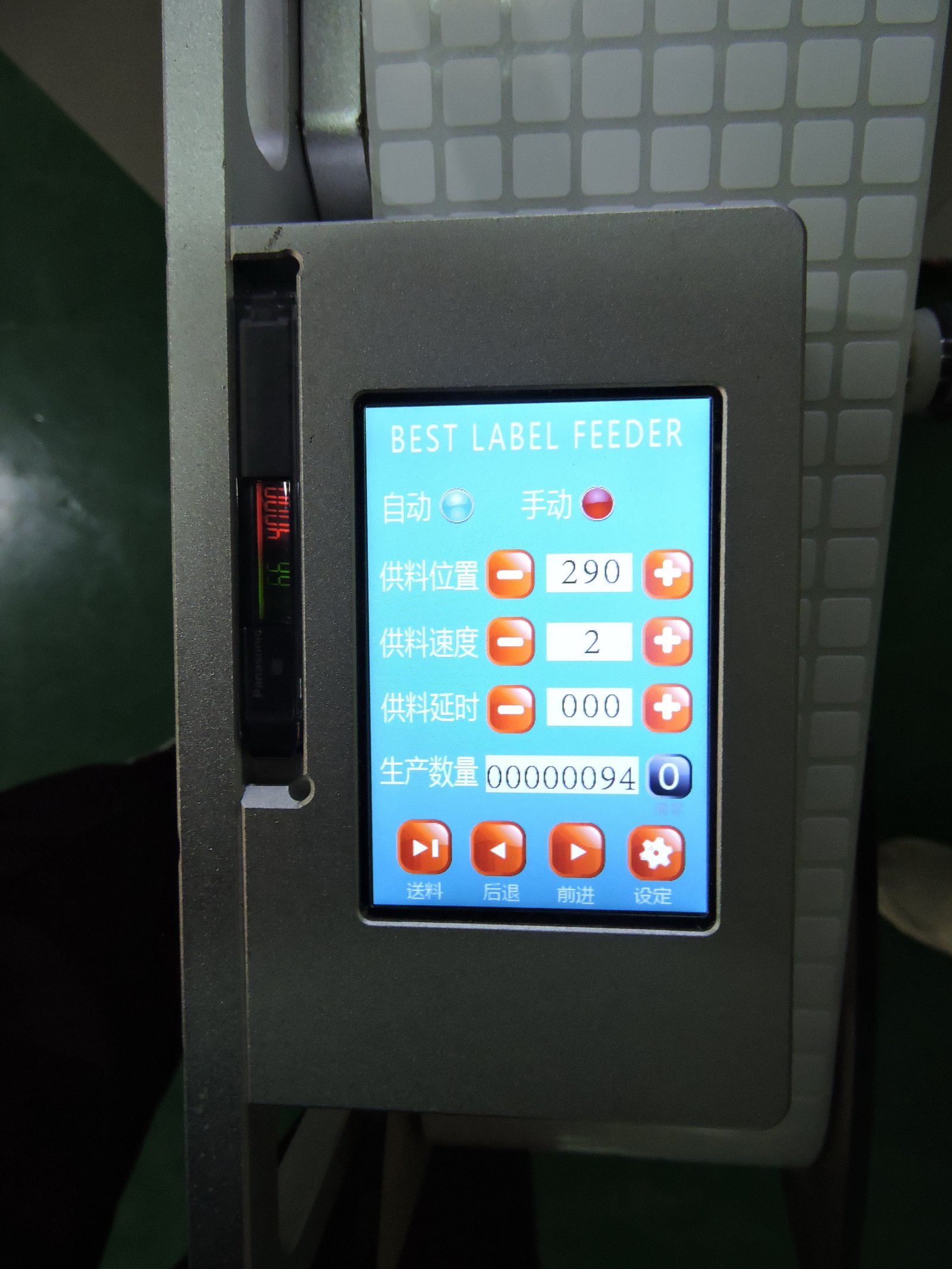
The image above shows the display and button area of the label feeder, where feeding position, feeding speed, delay and count are all set.
Housing nameplates: first judge whether a placement machine should be used
Nameplates are large and are often applied to non-PCB workpieces such as housings and panels. The placement head and nozzle of a placement machine are designed for components, so they are unsuitable for large nameplates and three-dimensional workpieces. There are two paths here:
- If the material is die-cut sheet material on backing paper, use the sheet label feeder PLF-100 / PLF-200 / PLF-300; selection follows backing paper length and peel width, not label width and column count;
- If the workpiece itself is not on a board, use a labeling machine, such as the single-head robotic arm LM3216, or a belt-track model with conveyor.
The boundaries of roll feeders should also be stated clearly: one feeder can handle all material sizes within its rated upper limit, supporting both single-row and multi-row. Nameplates and barcodes can be scheduled on the same feeder in different time slots, with only one material running at any one moment.
The image above shows the overall appearance of a single-head labeling machine, suitable for nameplate application where the workpiece is not on a PCB.
Three things easily overlooked on site
Power supply and interference. The feeder operating voltage is 24 V, and current must be greater than 2 A. The manual explicitly requires not sharing the same power outlet with high-power equipment. Baking tunnels and burn-in racks are nearby in home appliance factories, so keep this rule when wiring.
Heat sources and dust. The feeder should not be directly exposed to sunlight or other heat sources. The peel blade and receiving platform must not be subjected to impact or contamination—once adhesive residue accumulates at these two places, the peel angle changes and labels begin to drift.
Material threading direction. The carrier tape angle must remain straight; the guide width limit slider is moved to the tape width after loosening the set screw inside with a hex key, and the pressing plate height is adjusted according to label thickness. With these two set properly, double feeds and deviation will be much reduced.
How to connect signals with the placement machine
Three connection methods, selected in the interface:
| Connection method | Wiring | Interface setting | Application |
|---|---|---|---|
| Feeder tells placement machine material is present | yellow wire | material-present signal→enabled | placement machine needs to judge whether pickup is possible |
| Placement machine controls feeder feeding | green wire | feed signal→enabled | driven by machine cycle |
| Feeder feeds by itself | — | feed signal→disabled | automatically feeds when no label on the platform |
There is a simple standard for setting the fiber-optic sensor: the working set value is 200 greater than the sensing value in the no-material state; the lamp on indicates material detected.
Selection: answer three questions first
- Is the label roll material or sheet material? Sheet material uses the PLF series; roll material uses the label feeder.
- How many millimeters is the widest label? This determines whether the width class is 32, 60, 100, 150, 200 or 250. Choosing one size larger will not make small labels harder to feed; just set it by the widest one.
- What brand is the placement machine? Fuji, Panasonic, JUKI, Yamaha, Samsung (Hanwha) and ASM each have corresponding model prefixes; non-standard platforms use standard or classic models.
With these three answers, the model is basically determined. For classes and dimensions, see the label feeder page; for how to distinguish sheet from roll, see sheet label feeder or roll label feeder.