
Conclusion
A certain FPC factory feeds both stiffener steel sheets and Mylar tape as rolled auxiliary materials. Previously, operators manually peeled sheets and applied them to boards; thin sheets warped and could not be pressed flat, edges were easily crushed, and misaligned placements were picked out by visual inspection and re-applied. After mounting LFJUKI-100 on JUKI feeders, both materials are integrated into the same placement program, with peeler blade angle and nozzle pressure adjusted separately per material.
Production Line and Previous Labeling Method
This factory makes flexible board assemblies, and both auxiliary materials—stiffener and isolation—are completed on the SMT line. Stiffener steel sheet width is within 100 mm, supplied in rolls with release paper, with individual pieces ranging from a few millimeters to over twenty millimeters; Mylar tape is thinner and must be applied flat without wrinkles.
The previous method was a manual station set up offline: peel the piece from the carrier tape, align to the silkscreen frame, and position by eye. Steel sheets are hard and thin—peeling at the wrong angle bends them, and they cannot be pressed flat after application; Mylar is soft and curls at the edges when peeled quickly. Misaligned boards had to be peeled off and re-applied, leaving adhesive marks on the board surface, and crushed portions could only be scrapped.
Selection and Configuration
The selected model is LFJUKI-100, a rolled label feeder for JUKI machines, with body dimensions 640 × 135 × 160 mm and weight 7.5 kg, mounted on standard feeder positions of JUKI KE700 / KE2000 / FX / JX / JM series.
Three aspects match up. First, label width 5–98 mm and label length L2–40 mm cover everything from narrow steel strips to wide stiffener sheets; column count 1–12 allows several materials to be arranged in different lanes, picked up in one pass by the placement head. Second, JUKI feeders are directly replaced without machine modification or additional signal wiring. Third, the peel direction is material-switchable: the manual states that when small labels are difficult to peel, the peeler blade can be flipped to the low-angle side; for large labels or materials that detach easily, the spring take-up shaft can be bypassed to avoid excessive peel angle and premature detachment.
On-Machine Setup and Adjustment
Four steps to install: push the feeder into the slot and lock, thread the material, align the fiber sensor, and adjust parameters on the touchscreen. When threading, set the guide width-limiting slider to the appropriate position for the carrier width, and loosen or tighten the four pressure plate screws according to material thickness; the fiber sensor working setpoint should be 200 higher than the reading in the no-material state, so that the criterion is light on with material and light off without. Power supply 24 V, current greater than 2 A.
Adjustment focuses on two items.
Peeler blade angle. Mylar is thin and soft—after peeling it must fully separate from the backing paper for easy pickup, and too large an angle causes curling; steel sheets are hard and hold their flat shape after peeling, so the peel point can be set closer. A single feeder handles both materials with the peeler blade direction unchanged, distinguished by feed position and feed speed: feed position determines how far the label stops beyond the peeler blade, and speed is first set for clean peeling, then tuned toward cycle time.
Nozzle pressure. This is set in the placement machine’s pickup parameters, not on the feeder. Steel sheets are thick and require pressure to pick reliably; Mylar is thin, and excessive pressure leaves marks on the material surface. For thin materials, start with a lower value, confirm reliable pickup without offset, then fine-tune upward.
For each material change, run twenty pieces at low speed first, checking piece by piece whether peeling is complete, whether the material surface has marks, and whether edges curl after placement; then switch to normal cycle time.
Changes After On-Machine Installation
Stiffener and Mylar have been integrated from the offline station into the placement program; the manual labeling station has been removed or reduced in staffing, with the specific number depending on each factory’s scheduling. Material changes go from “line stop waiting for manual work” to “feeder roll change,” with changeover requiring only program changes and roll changes. Labeling positions are determined by program coordinates, ensuring consistent positions across repeated production of the same board type, with no more manual alignment variation.
First-article and sampling records note label position coordinates, peel status, and material surface condition. Customer acceptance confirms that “stiffener and Mylar no longer require a separate manual labeling station.” Yield and cycle time are subject to each customer’s own statistical criteria and are not cited in this article.
FAQ
Can stiffener steel sheets and Mylar share one feeder? They can share if dimensions fall within the applicable range; the difference is rigidity: steel sheets can run faster, Mylar must run slower, and nozzle pressure must be set separately.
What to check first if peeling is incomplete? First check which side of the peeler blade is in use and whether the feed position delivers the peel point correctly, then check whether the nozzle pickup position is centered on the label. The feeder itself is generally not the main cause.
Can it be mounted on machines other than JUKI? The LFJUKI series corresponds to JUKI feeders; placement machines from other brands are selected by their respective series, and interfaces are not interchangeable.
For verification based on board type, stiffener sheet specifications, and placement machine model, contact us directly: Kenny Pan · Sales Manager · Phone/WeChat +86 134 2139 1163 · Sales@baxida-tech.com
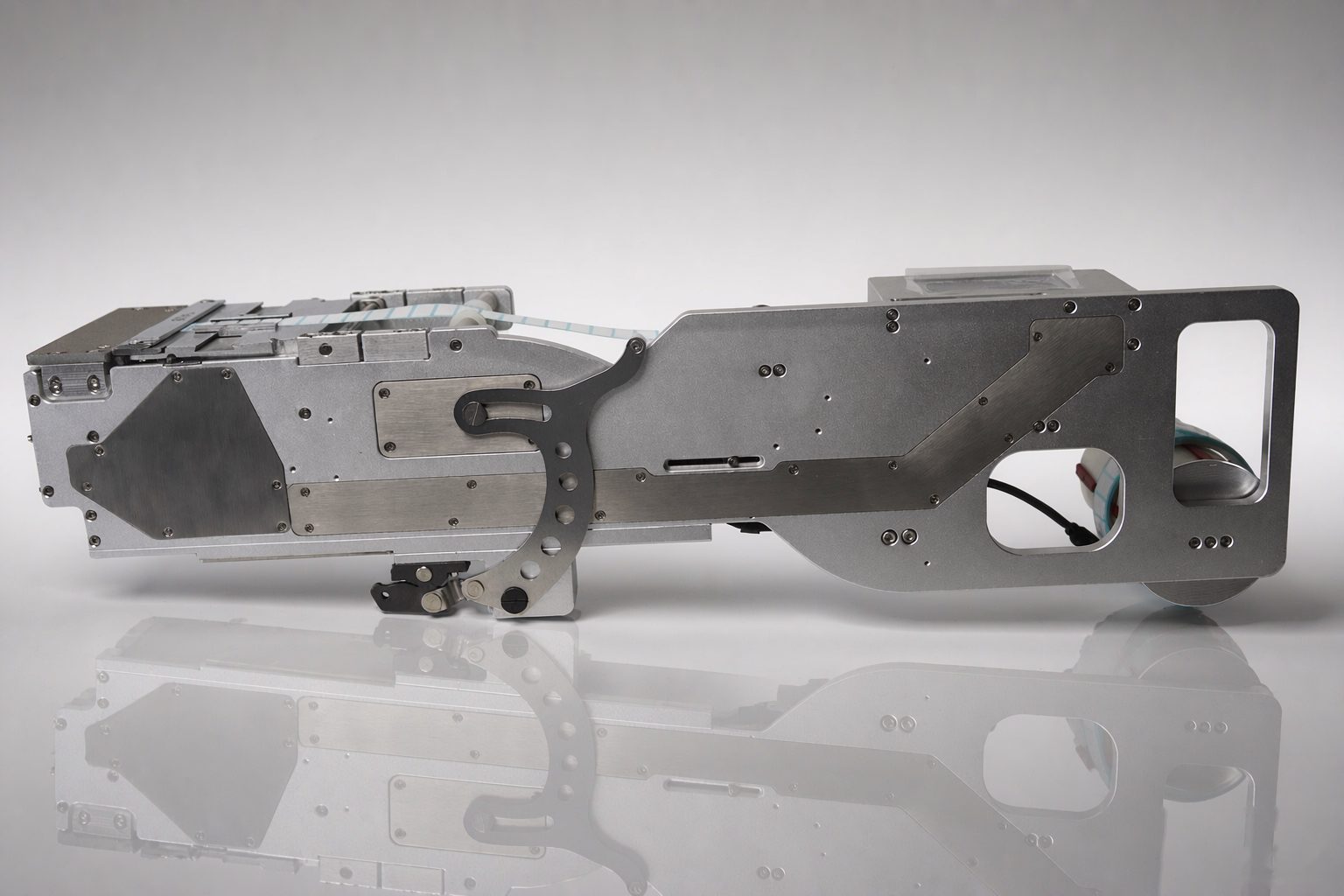
Shop floor photo: rolled label feeder for JUKI placement machines
This article is a scenario-based illustration of typical operating conditions, not a specific customer project; actual configuration is subject to selection confirmation.